














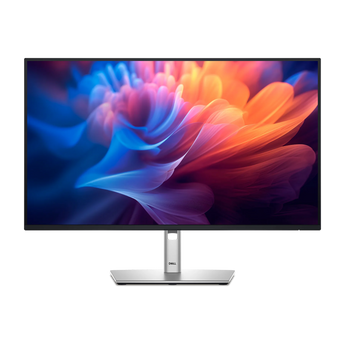
Pro Plus P2725H
27" Office Monitor

201,90 €
incl. VAT, plus shipping
delivered in 17 to 18 days
27 Inch | 16:09
1920×1080 px | 82 ppi
IPS | 100 Hz | 8 ms
Ergonomically Adjustable
Energy Label
Product Data Sheet
Manufacturer Information

Dell GmbH
Unterschweinstiege 10
60549 Frankfurt am Main
Germany
Contact form: https://www.dell.com/en-uk/lp/contact-us

Reviews
Description
All-day productivity on a whole new level

Moderner Dell Monitor mit hochauflösendem, violettem abstrakten Display-Hintergrund vor lila Hintergrund Moderner Dell Monitor mit hochauflösendem, violettem abstrakten Display-Hintergrund vor lila Hintergrund

This monitor with an ultra-thin bezel offers a more generous screen area.
Working with clear details

Color Consistency:
In-plane switching (IPS) technology enables vibrant colors across a wide viewing angle.

1,500:1 Contrast Ratio:
Enjoy deeper blacks and brighter whites.

Zwei Dell Monitore mit dünnen Rändern und silbernem Standfuß, die bunte Finanzdiagramme und Dashboards anzeigen Zwei Dell Monitore mit dünnen Rändern und silbernem Standfuß, die bunte Finanzdiagramme und Dashboards anzeigen
Connect your accessories using a variety of ports.
Connectivity for more productivity
  1. Extensive Connectivity: Wide variety of ports for all your accessories
  2. Easily accessible USB ports: Including USB-C downstream for up to 15W of power delivery
  3. Mounting Compatibility: VESA-compatible accessories and soundbar

Mitarbeiter arbeitet im modernen Büro an einem Dell Monitor mit Webcam und verbundenem Laptop Mitarbeiter arbeitet im modernen Büro an einem Dell Monitor mit Webcam und verbundenem Laptop
Adaptable to your preferences during the workday
Ergonomic design
Seitenansicht eines Monitors mit silbernem Standfuß, der die Neigungsverstellung des Displays veranschaulicht.
Ansicht von oben auf den höhenverstellbaren Standfuß eines Dell Monitors, der sich um die eigene Achse dreht.
Pivot

Bidirectional adjustment up to 45°

To tend

Adjustment from -5° to +21°

Dell Monitor mit ergonomischem Standfuß und verstellbarem, schwenkbarem Display im Querformat
Rückansicht eines Dell Monitors mit silbernem Standfuß und integriertem Logo auf schwarzem Gehäuse
Height

Adjustable to a height of up to 150 mm

Spin

Bidirectional adjustment up to 90°

Dell Display and Peripheral Manager

Maximum productivity:
EasyArrange organizes applications across different screens with pre-set partitions and adjusts up to five windows to improve multitasking. With EasyArrange Memory, you can save application profiles and restore them manually, on a schedule, or upon startup.

Customize your view:
Work comfortably, day or night. Automate your brightness and contrast settings according to your schedule.

Better manageability:
Save time and improve IT efficiency with the Dell Device Management Console to manage your Dell peripherals at scale from a single cloud-based console. Discover the advanced features of the command line interface with Dell Display and Peripheral Manager.

Screenshot der Monitor-Software mit Benutzeroberfläche zur Display-Konfiguration und Layout-Auswahl. Screenshot der Monitor-Software mit Benutzeroberfläche zur Display-Konfiguration und Layout-Auswahl.
Connectivity options
Ports and Slots
  1. Security lock slot (based on Kensington Security Slot™)
  2. Power connector
  3. HDMI (HDCP 1.4) (supports up to WUXGA 1920 x 1200, 100 Hz, HDMI 1.4 TMDS)
  4. Stand lock
  5. DisplayPort 1.2 (HDCP 1.4)
  6. VGA
  7. USB 3.2 Gen 1 Type-B upstream
  8. USB 3.2 Gen 1 Type-A downstream ports (2)
  9. Soundbar slots
  10. USB 3.2 Gen 1 Type-A downstream
  11. USB 3.2 Gen 1 Type-C downstream (PD up to 15 W)

Rückseite eines Gaming-Monitors mit nummerierten Anschlüssen wie HDMI, DisplayPort und USB. Rückseite eines Gaming-Monitors mit nummerierten Anschlüssen wie HDMI, DisplayPort und USB.
Even easier on the eyes
Moderner Dell Monitor mit Finanz-Dashboard, Tastatur, Maus und Tischlampe auf hellem Schreibtisch.
Vergleichsgrafik von bunten Kugeln zur Demonstration des Unterschieds zwischen 60Hz und 100Hz Bildwiederholrate.
Refresh rate

The 100 Hz refresh rate ensures less flicker, smoother scrolling, and more fluid movements.

Enhanced ComfortView Plus Feature

This feature reduces harmful blue light emissions by less than 35% without color compromise, so you can work comfortably all day long.

Vivid Colors

Enjoy comprehensive color coverage with up to 16.7 million colors and 99% sRGB.

Abstrakte 3D-Partikelkugel in bunten Farben mit 99% sRGB Farbraum-Farbverlauf auf blau-pinkem Hintergrund. Abstrakte 3D-Partikelkugel in bunten Farben mit 99% sRGB Farbraum-Farbverlauf auf blau-pinkem Hintergrund.
Technical Details
Expand All

Your Perfect Bundle.

Shop Smart and Expand Your Possibilities.

For Your Next Level.

Top Recommendations straight from our Lineup.